Many businesses start by managing stock in spreadsheets. The basic system functions effectively during initial phases because it stays understandable and costs minimal money to operate. Spreadsheets become more difficult to handle as the business expands its operations.
Nowadays, businesses face rising stock errors, which lead to longer update processes while their teams battle to monitor inventory between various warehouse sites and retail platforms. The situation requires inventory software to solve this particular problem.
The transition from spreadsheet usage to digital systems shows a significant transformation. The execution process will experience delays, wrong information and low system usage because of insufficient planning.
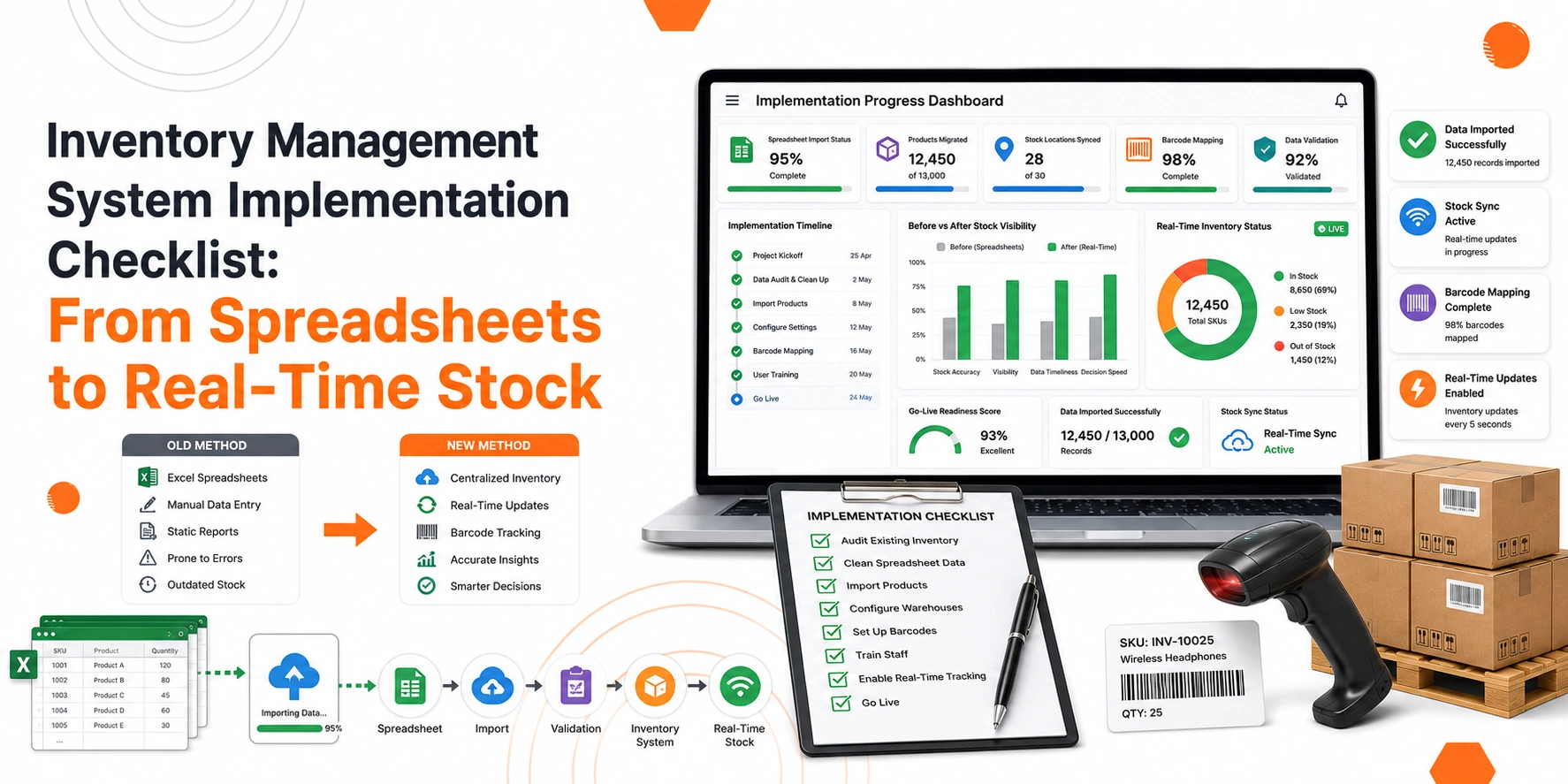
A well-structured method creates a smooth transition process that prevents any unexpected issues. The checklist includes essential procedures to deploy inventory management system software and create dependable stock control systems.
Build Custom Software That Fits Your Business
From CRM to inventory systems — we design solutions around your workflow, not the other way around.
Why Businesses Outgrow Spreadsheets
Spreadsheets can handle basic inventory tracking, but they often create challenges when operations become more complex.
Common problems include:
- Duplicate data entries
- Incorrect stock counts
- Delayed updates
- Lack of visibility across locations
- Difficulty managing large product catalogues
- Limited reporting capabilities
When stock information is spread across multiple files, it becomes difficult to maintain accuracy. A single mistake can affect purchasing, fulfilment, and customer satisfaction.
An inventory management software solution centralises stock information and provides real-time updates across the business.
Benefits of Moving to an Inventory System
Before starting implementation, it helps to understand the value a modern inventory system can provide.
Some key benefits include:
- Real-time stock visibility
- Improved inventory accuracy
- Faster stock counts
- Better purchasing decisions
- Reduced stockouts
- Lower risk of overstocking
- Improved reporting and forecasting
- Stronger warehouse efficiency
Businesses can also connect inventory processes with other operational systems through inventory software integrations, creating a more connected workflow.
Inventory Management System Implementation Checklist
Step 1: Define Your Business Requirements
Every business has different inventory needs. Before selecting an inventory management system software, identify your key requirements. Consider questions such as:
- How many products do you manage?
- How many locations hold inventory?
- Do you sell online?
- Do you operate retail stores?
- Do you manage batch or serial numbers?
- Do you need barcode scanning?
Understanding your requirements helps create a clear implementation plan and prevents costly changes later.
Step 2: Review Existing Inventory Processes
Take time to analyse your current workflow. Document how inventory moves through your business. This should include:
- Purchasing
- Receiving goods
- Stock transfers
- Storage
- Order fulfilment
- Returns processing
Many businesses discover process gaps during this stage. Addressing these issues before implementation can improve the success of the new system.
Step 3: Clean and Organise Inventory Data
Data quality plays a major role in implementation success. Before importing information into the new system, review all existing records.
Check for:
- Duplicate products
- Missing descriptions
- Incorrect stock quantities
- Inconsistent SKU formats
- Outdated product information
A clean database improves reporting accuracy and reduces confusion for staff.
Step 4: Standardise Product Codes
Many businesses use inconsistent naming conventions within spreadsheets. Create a standard product coding structure before implementation.
This should include:
- Product names
- SKU numbers
- Categories
- Units of measure
- Supplier information
Consistent product data supports accurate inventory tracking and reporting.
Step 5: Conduct a Physical Stock Count
A system is only as accurate as the data entered into it. Before going live, perform a full physical stock count. This process helps:
- Verify actual inventory levels
- Identify discrepancies
- Remove obsolete stock records
- Establish an accurate starting point
Skipping this step often creates problems after implementation.
Step 6: Set Up Warehouse and Storage Locations
If inventory is stored across multiple locations, establish a clear location structure. Examples include:
- Warehouses
- Retail outlets
- Stockrooms
- Shelving zones
- Bin locations
A well-organised location structure supports efficient stock movement and improves inventory visibility.
Step 7: Implement a Barcode Inventory System
A barcode inventory system helps reduce manual entry and improve stock accuracy.
Barcode scanning supports:
- Goods receiving
- Stock transfers
- Stock counts
- Picking and packing
- Returns processing
Businesses that move away from manual data entry often see significant improvements in inventory accuracy. A properly configured barcode-based inventory system also reduces human error and speeds up warehouse operations.
Also Read: Inventory Management Software Singapore: Cost, Features & ROI for SMEs
Integrating Inventory with Other Business Functions
Inventory operates independently from all other business operations. Businesses need to link their inventory information with their operational systems to achieve maximum system efficiency.
Step 8: Plan Inventory Software Integrations
Strong inventory software integrations create a connected business environment. The integration system allows different departments to share data automatically, which stops staff members from entering the same information multiple times.
Common integration areas include:
- Accounting
- Sales
- Procurement
- Warehousing
- Ecommerce platforms
Well-planned inventory software integrations improve visibility and support better decision-making.
Step 9: Establish POS Inventory Integration
Retail businesses often benefit from POS inventory integration. This connection allows inventory levels to update automatically whenever a sale takes place.
Benefits include:
- Real-time stock updates
- Reduced overselling
- Faster stock visibility
- Better replenishment planning
A reliable POS inventory integration helps ensure inventory records remain accurate throughout the day.
Step 10: Connect Accounting and Inventory Processes
Financial and inventory data should work together. Many organisations use accounting inventory software to improve financial visibility and stock control.
Connecting inventory with accounting functions can support:
- Cost tracking
- Purchase management
- Inventory valuation
- Financial reporting
For businesses evaluating accounting inventory software in Singapore, integration should be a key consideration during implementation planning.
Supporting Ecommerce Growth
Step 11: Prepare for Ecommerce Inventory Integration
Online sales continue to grow across many industries. Businesses selling through multiple channels should prioritise ecommerce inventory integration during implementation.
Without integration, inventory updates often rely on manual processes, increasing the risk of stock discrepancies. A strong ecommerce inventory integration strategy helps:
- Synchronise stock levels
- Reduce overselling
- Improve customer experience
- Support faster order fulfilment
This becomes especially important during seasonal sales periods when order volumes increase.
Setting Inventory Rules and Controls
Step 12: Configure Reorder Points
One of the main advantages of inventory management software is automated stock control. Set minimum stock levels for each product. When inventory falls below a predefined threshold, the system can trigger replenishment activities. This helps reduce:
- Stockouts
- Emergency purchasing
- Lost sales opportunities
Step 13: Define User Roles and Permissions
Not every employee requires access to all inventory functions. Create user roles based on job responsibilities. Examples include:
Warehouse Staff
- Receive stock
- Transfer stock
- Conduct stock counts
Purchasing Team
- Create purchase orders
- Manage suppliers
Management
- Access reports
- Review performance metrics
Clear permissions improve security and reduce operational risks.
Training and Change Management
Step 14: Train Employees Early
Technology alone does not improve inventory management. Employees must understand how to use the system correctly. Training should cover:
- Daily workflows
- Stock receiving
- Order processing
- Inventory adjustments
- Reporting functions
Practical training sessions help users gain confidence before launch.
Step 15: Appoint an Internal Project Owner
Assign responsibility to a dedicated team member. This person should:
- Coordinate implementation activities
- Work with stakeholders
- Monitor progress
- Support users after launch
Having a clear owner helps maintain accountability throughout the project.
Testing Before Go-Live
Step 16: Run a Pilot Test
Before full deployment, test the system using real inventory scenarios. Check:
- Product creation
- Stock receiving
- Transfers
- Order fulfilment
- Reporting
Testing helps identify issues before they affect daily operations.
Step 17: Verify Data Accuracy
Review all imported inventory records.
Confirm:
- Product details
- Stock balances
- Warehouse locations
- Supplier information
Accurate data supports a smooth transition.
Step 18: Conduct Parallel Operations
Many businesses benefit from running the old and new systems together for a short period. This approach allows teams to:
- Compare results
- Verify accuracy
- Build confidence in the new system
Parallel operations can reduce implementation risks during the early stages.
Post-Implementation Monitoring
Step 19: Track Key Performance Indicators
After launch, monitor performance closely. Important metrics include:
- Inventory accuracy
- Stock turnover
- Order fulfilment speed
- Stockout frequency
- Inventory carrying costs
These indicators help measure the impact of the new system.
Step 20: Review and Optimise Processes
Implementation is not the final step. Inventory processes should be reviewed regularly to identify improvement opportunities. Businesses often refine:
- Reorder settings
- Warehouse layouts
- Stock allocation methods
- Reporting structures
Continuous improvement helps maximise the value of the system over time.
Also Read: Inventory Management System Guide for Retail, Wholesale & E-commerce Businesses
Common Mistakes to Avoid During Implementation
Many inventory projects face challenges because of avoidable mistakes. Common issues include:
Poor Data Quality
Incomplete or inaccurate product records create problems from the beginning.
Lack of Staff Training
Employees who do not understand the system may continue using old methods.
Rushing the Go-Live Process
Skipping testing often leads to operational disruptions.
Ignoring Integration Requirements
Failing to plan inventory software integrations can result in disconnected workflows.
Underestimating Change Management
Successful implementation requires support from the entire organisation.
Read Also: Best Inventory Management System for Small Business: Singapore SME Checklist
Conclusion
Moving from spreadsheets to real-time inventory management is a significant milestone for any business. Businesses track their product inventory through spreadsheet usage, but expanding companies need better management systems for their existing stock inventory.
Implementing an inventory management system entails several steps. These include cleaning the inventory data, conducting stock counts, implementing processes for the inventory system, implementing a barcode system, and integrating inventory management software to ensure long-term growth for the business.
Whether a business is looking for an inventory management system that allows them to maintain more accurate stock levels, generate better reports for the inventory, integrate with POS inventory systems, integrate with ecommerce inventory systems, or integrate with accounting inventory software, careful planning and consideration of the inventory management system is crucial to the success of the business.