For modern businesses, managing inventory no longer means just writing numbers on a spreadsheet. Integrated inventory software helps companies work faster, reduce mistakes, and make smarter choices.
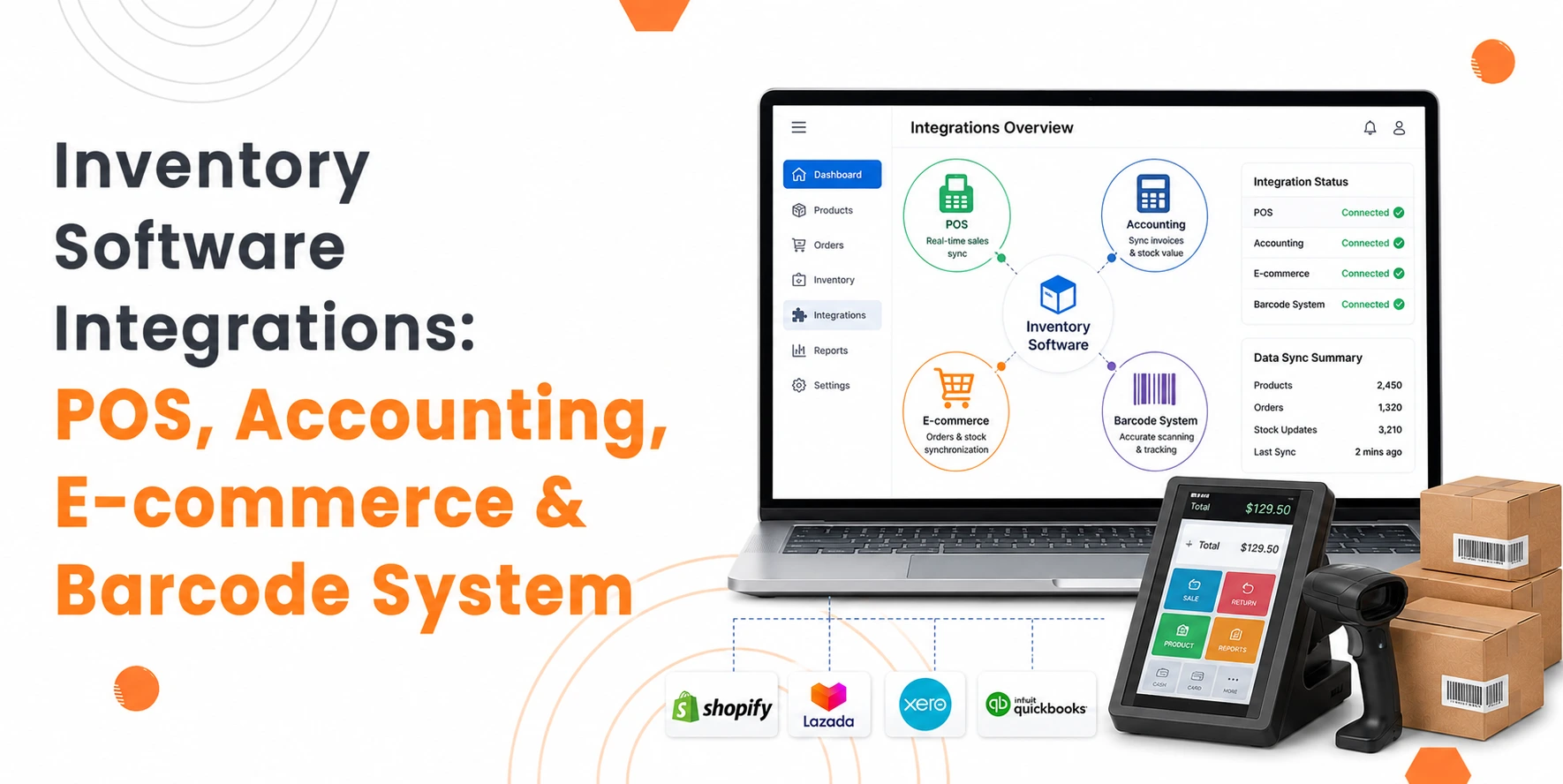
By linking inventory software with POS systems, accounting software, e-commerce platforms, and barcode/RFID systems, businesses create a single, clear view of stock.
In this guide, you will understand how each integration works, its benefits, how to set it up, and common mistakes to avoid.
Build Custom Software That Fits Your Business
From CRM to inventory systems — we design solutions around your workflow, not the other way around.
1. POS Inventory Integration: Real-Time Sales & Stock Synchronisation
POS integration updates stock automatically with each sale, stops overselling, and shows correct inventory across all stores.
A POS integration connects your inventory system to your sales devices, updating stock instantly. It works best for businesses with multiple stores or both physical and online shops.
How It Works:
- A customer buys a product in a store or online.
- The POS system records the sale and sends the data to the inventory software.
- Inventory software subtracts the sold item and updates all stores and channels.
- Stock alerts pop up if numbers go too low, prompting restocking or automatic orders.
- Sales dashboards refresh to show which products sell fast and which move slowly.
Benefits:
- Stops overselling across stores and online.
- Reduces manual stock updates and mistakes.
- Gives clear sales insights for promotions and restocking.
- Improves customer experience with accurate availability.
- Supports multi-channel sales from stores, online, or pop-ups.
Example Use Case:
A fashion shop with many stores sells a size 10 sneaker. The system subtracts it from all stores and updates online stock. Staff see which sizes sell fast and move stock efficiently.
By linking POS with inventory software, businesses see stock clearly, work faster, and make customers happy.
2. Accounting Integration: Automating Financial Workflows
Accounting integration pushes inventory data into Xero or QuickBooks automatically, which keeps finance accurate and up-to-date.
Connecting inventory tracking software with accounting tools removes manual entry, reduces errors, and shows real-time profit, revenue, and costs.
How It Works:
- Inventory software calculates COGS every time a product sells, returns, or moves.
- It posts transactions to accounting software instantly.
- The system tracks invoices, payments, and orders in one place.
- Inventory value updates automatically for correct reporting.
Benefits:
- Stops double entries and human mistakes.
- Shows real-time profit, revenue, and cash flow.
- Makes GST reporting easier for Singapore SMEs.
- Free finance staff for planning instead of manual checking.
- Works across stores, online shops, and wholesale.
Implementation Tip:
- Keep SKUs the same across systems.
- Test before going live.
- Check PSG grants to support costs for accounting inventory software in Singapore.
- Assign a team member to maintain data.
Example Use Case:
An electronics retailer uses QuickBooks linked to an inventory management system software. Each sale updates revenue and COGS instantly, letting finance staff generate accurate reports within hours.
3. E-commerce Integration: Multi-Channel Inventory Visibility
E-commerce integration keeps stock updated online and offline, preventing overselling and saving time.
Linking inventory software with Shopify, WooCommerce, Lazada, or Shopee ensures stock changes automatically whenever customers order.
How It Works:
- Customer orders online.
- The e-commerce platform sends order data to inventory software.
- Inventory software subtracts sold items and updates all channels.
- Alerts pop up for low stock, sometimes creating automatic orders.
- All sales, returns, and adjustments stay current.
Benefits:
- Stops overselling across marketplaces.
- Reduces manual work and errors.
- Tracks stock in multiple warehouses.
- Keeps customers happy with correct availability.
- Shows which products sell fastest for planning.
Example Use Case:
An SME sells electronics on Shopify, Lazada, and in-store, and uses inventory management software. During a sale, the software updates all stock automatically, preventing mistakes and helping staff restock on time.
Implementation Tip:
- Use API or native integrations.
- Check SKUs regularly.
- Enable low-stock alerts.
4. Barcode & RFID Integration: Accuracy & Traceability
A barcode inventory system tracks stock quickly, reduces mistakes, and maintains batch and expiry data accurately.
Barcode and RFID integration tracks stock quickly, prevents mistakes, and keeps batch or expiry info correct. Adding barcodes or RFID chips to products lets cloud inventory software track movement automatically.
How It Works:
- Tag each product with a barcode or RFID chip.
- Scan sales, returns, or transfers with readers.
- Inventory software tracks batch numbers, expiry dates, and product location.
- Data helps create reports, check compliance, and manage warehouses.
Benefits:
- Speeds up stock counts from hours to minutes.
- Reduces counting mistakes.
- Ensures traceability for F&B, pharma, or cosmetics.
- Helps plan restocking and warehouse moves.
- Improves packing, picking, and shipping speed.
Implementation Tip:
- Keep SKUs and batch numbers consistent.
- Set up scanners, printers, and mobile devices.
- Train staff on scanning and handling properly.
- Test the system with a small batch before full rollout.
Example Use Case:
A pharmaceutical distributor scans shipments with RFID. Inventory updates, tracks batches, and ensures correct products ship, reducing mistakes and staying compliant.
5. API Workflows: Custom Automations
API workflows let inventory software solutions automate tasks across multiple systems, saving time and keeping data accurate.
APIs link inventory with 3PL, CRM, accounting, and e-commerce platforms for automatic actions.
How It Works:
- The inventory system watches stock, sales, and returns in real time.
- When stock is low or orders come in, the API triggers actions in other systems.
- Automates purchase orders, stock updates, alerts, and data syncing.
Why It Matters:
- Let’s SMEs scale without extra staff.
- Reduces mistakes in stock or orders.
- Sends restock alerts instantly.
- Connects multiple systems seamlessly.
- Can be customised to business needs.
Example Use Case:
A food distributor triggers automatic restocking when an ingredient runs low. Inventory updates online stores and alerts warehouse staff immediately.
Implementation Tip:
- Write and test all workflows.
- Keep product codes the same across systems.
- Assign someone to watch and fix errors.
Common Implementation Mistakes to Avoid
Many companies fail to get the full benefits of inventory software integrations due to skipping essential steps in the implementation process
Even with the most advanced inventory management software or even barcode inventory software, there are a variety of common mistakes that can be made that will hinder the operations of the business.
Some Implementation mistakes are:
- Skipping data preparation: If the data that is being imported into the inventory management software has errors, it will lead to errors within the software.
- Rushing staff training: The employees that are handling inventory from the stores, warehouses, and even accounting must be properly trained with the new inventory management software.
- Ignoring integration testing: If the point of sale, e-commerce platforms, accounting platforms, or other APIs are not properly tested and integrated with the new inventory management software, there will be issues with syncing data.
- Underestimating timelines: The implementation of inventory management software can take time, especially if there are multiple locations or a large catalogue of products.
- No dedicated owner: Without a dedicated staff member who manages the master data for inventory management software, monitors alerts, and handles exceptions, errors in data can occur.
- Inconsistent SKUs or batch codes: If the product codes that are used within POS, e-commerce, or inventory management software platforms are not consistent across each software platform, the integrations will not function properly.
Conclusion
Overall, integrating inventory software with POS, accounting, e-commerce, and barcode/RFID systems transforms the way that businesses manage inventory, finances, and sales. With such an integration in place, businesses can gain visibility into the inventory levels of their products across all sales channels.
Furthermore, they can eliminate errors that are made during manual inventory updates and streamline the process from warehouse to checkout counter. By integrating with different systems using APIs and automated alerts, the inventory levels can be kept accurate. In addition, purchase orders can be made automatically, and inventory can be restocked on time.
For SMEs in Singapore, such an integration can save time and help them comply with Singapore’s GST regulations. Furthermore, the inventory data can be used to make better business decisions. By properly planning for such an integration and training their staff on how to use it, SMEs can maximise their efficiency and their profits from inventory management.